Home Lab: Replacing the ISP Router with OpenWrt, UniFi and VLANs
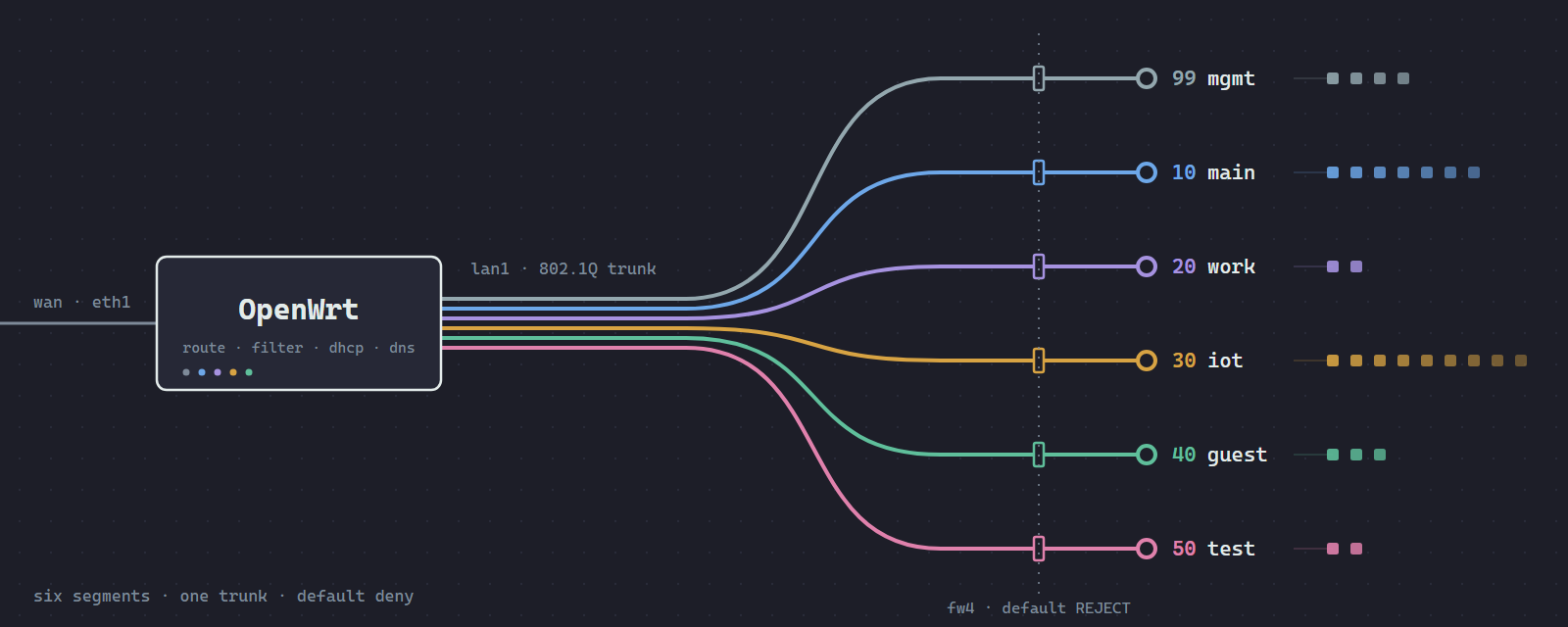
Table of Contents
For years my home network was whatever the ISP router shipped with: one box doing routing, Wi-Fi, DHCP and DNS, with three SSIDs that looked separate. They weren’t. All three landed in the same broadcast domain, so a guest on the “guest” network or my IoT devices could see and reach the NAS.
I finally got around to building out a home lab that better accommodates my needs:
- a GL.iNet Flint 2 (GL-MT6000) running stock OpenWrt1, which does routing, firewall, DHCP and DNS,
- a UniFi USW Lite 8 PoE switch and a UniFi U6+ access point, which only tag frames,
- a Raspberry Pi 5 running UniFi OS Server as the controller,
- a GL.iNet Beryl AX as a sandboxed lab router for devices under test.
The end result is six VLANs, each its own subnet, with a firewall deciding what can talk to what. Below is how it’s laid out, what the OpenWrt config looks like, and the handful of services that needed extra work to function across VLAN boundaries.
OpenWrt⏚
I wanted every routing and firewall decision to live in one place, in plain text I could read and diff. On OpenWrt that’s three files in /etc/config: network, firewall and dhcp. The firewall is fw42, which renders to nftables3, and DHCP/DNS is dnsmasq4. Neither is hidden behind a UI that only exposes half the options.
The Flint 2 is well supported by upstream OpenWrt (MediaTek Filogic, MT7986)5, so I’m running the stock image and not GL.iNet’s fork. It has a 2.5G WAN port, a 2.5G LAN port and four 1G LAN ports, which is enough for this house.
I went with UniFi for the switch and AP because the hardware is good and the controller makes Wi-Fi easy. But I didn’t want a UniFi gateway, so UniFi only handles layer 2 here.
Physical layout⏚
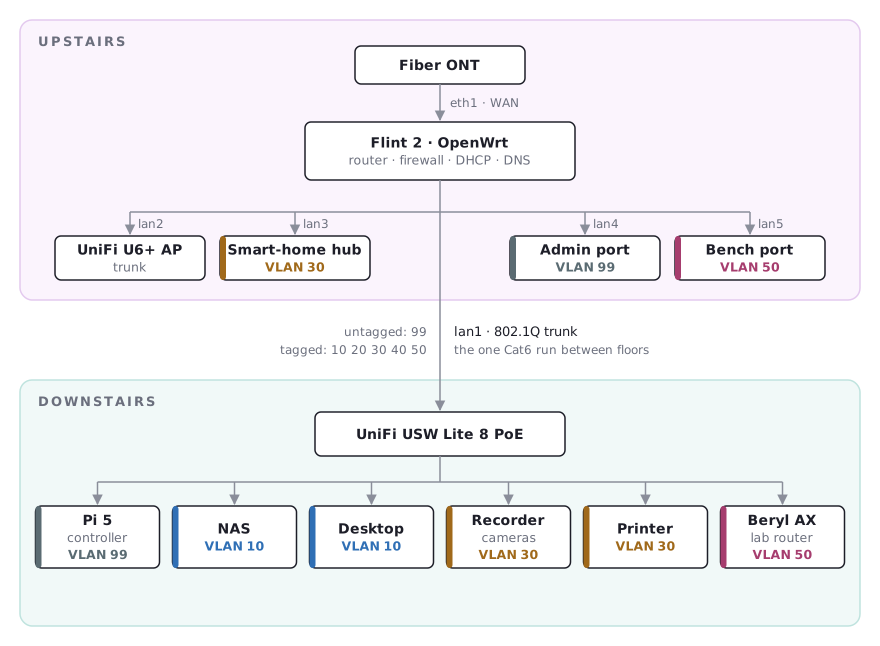
One constraint shaped the topology: there’s a single Cat6 run between floors. The fiber ONT is upstairs and most of the equipment is downstairs.
So the router sits upstairs next to the ONT, and that one cable carries an 802.1Q trunk down to the switch. The WAN is a short patch cable, and the AP plugs straight into the router, so Wi-Fi traffic headed to the internet never crosses the run. The only thing that does is Wi-Fi talking to wired devices downstairs, mostly phones hitting the NAS.
Segments⏚
| VLAN | Name | What’s on it |
|---|---|---|
| 99 | mgmt | router, switch, AP, UniFi controller |
| 10 | main | person phones, laptops, desktop, NAS |
| 20 | work | work laptops or equipment |
| 30 | iot | cameras, smart-home hub, printer, streaming box |
| 40 | guest | guests |
| 50 | test | lab router, with devices under test behind it |
Each one is 10.N.<vlan>.0/24 with the gateway at .1, so I can tell which VLAN a device is on from its address.
The config files⏚
network⏚
br-lan bridges all five LAN ports with VLAN filtering turned on6. Each bridge-vlan section says which ports carry that VLAN and how. t means tagged, and u* means untagged and also the port’s default VLAN (PVID). lan1 and lan2 are trunks, and the rest are access ports:
config bridge-vlan
	option device 'br-lan'
	option vlan '10'
	list ports 'lan1:t'
	list ports 'lan2:t'

config bridge-vlan
	option device 'br-lan'
	option vlan '99'
	list ports 'lan1:u*'
	list ports 'lan2:u*'
	list ports 'lan4:u*'

config interface 'main'
	option device 'br-lan.10'
	option proto 'static'
	option ipaddr '10.N.10.1'
	option netmask '255.255.255.0'
One interface sits on each VLAN device (br-lan.10, br-lan.20, and so on)7. On the MT6000 the WAN is eth1 because it has its own MAC rather than being a switch port, so option device 'wan' brings up nothing.
The management VLAN goes untagged on both trunks. That lets a factory-reset UniFi device pick up a management address with no UniFi gateway around to help. It also means there’s no “VLAN 99” network in the UniFi controller. Untagged frames don’t carry a VLAN ID, so on the UniFi side the built-in Default network is mgmt. Every other VLAN gets created in UniFi as a VLAN-only network with no DHCP8.
One UniFi setting to watch: DHCP Guarding is on by default with 192.168.2.1 prefilled. It silently drops DHCP replies from any other server, including the Flint’s.
firewall⏚
Every internal zone defaults to rejecting both traffic to the router and traffic routed through it. A zone looks like this:
config zone
	option name 'iot'
	list network 'iot'
	option input 'REJECT'
	option output 'ACCEPT'
	option forward 'REJECT'
forwarding sections open whole zone-to-zone paths, and rule sections open individual ports:
config forwarding
	option src 'main'
	option dest 'iot'

config rule
	option name 'Work-to-Printer'
	option src 'work'
	option dest 'iot'
	option dest_ip '10.N.30.x'
	option proto 'tcp'
	list dest_port '631'
	list dest_port '9100'
	list dest_port '515'
	option target 'ACCEPT'
The policy in one table. Rows can start connections to columns, and conntrack9 lets the replies back:
| from ↓ / to → | wan | mgmt | main | work | iot | guest | test |
|---|---|---|---|---|---|---|---|
| mgmt | ✔ | ✔ | ✔ | ✔ | |||
| main | ✔ | ✔ | ✔ | ✔ | |||
| work | ✔ | printer | lab router | ||||
| iot | ✔ | Plex | |||||
| guest | ✔ | ||||||
| test | ✔ |
Main can reach the cameras and printer, but nothing on IoT can open a connection back toward main. The NAS is only reachable from main, and that’s just because no rule allows anything else.
dhcp⏚
dnsmasq serves every VLAN. Each segment gets a pool section, and reservations are host entries. I keep reservations below .100, where the dynamic pools start:
config dhcp 'iot'
	option interface 'iot'
	option start '100'
	option limit '100'
	option leasetime '24h'
	option ra 'server'
	option dhcpv6 'server'
	list ra_flags 'other-config'

config host
	option name 'printer'
	option mac 'xx:xx:xx:xx:xx:xx'
	option ip '10.N.30.x'
The IPv6 flags on IoT come up again in the Matter section below.
Getting services across VLANs⏚
Splitting the network was the easy part. Most of the work went into getting specific things working again across the boundaries.
Printing from the work VLAN⏚
Work laptops get four ports to the printer and nothing else: 631 (IPP), 9100 (raw), 515 (LPD) and UDP 161 (SNMP). I didn’t expect to need SNMP, but Windows and macOS driver installs poll it, and without it adding the printer just hangs. The laptops add the printer by IP since discovery doesn’t cross VLANs.
Epson’s Windows driver was a separate headache. It installs its own port type that finds the printer by subnet broadcast on every print job, which can’t reach another VLAN. Switching it to a Standard TCP/IP port fixed it.
Discovery (mDNS)⏚
mDNS10 is link-local, so splitting devices into VLANs breaks AirPrint, casting and the smart-home apps. avahi’s reflector11 on the router fixes it. I restricted it to main and IoT, because by default it joins every interface, including the WAN:
[server]
allow-interfaces=br-lan.10,br-iot

[reflector]
enable-reflector=yes
SSDP/UPnP discovery doesn’t get reflected. My rule of thumb is that new devices go on IoT unless something on main needs to find them over SSDP.
Plex from the streaming box⏚
The streaming box lives on IoT because it’s ad-supported hardware that scans whatever network it’s on, and I don’t want it near the NAS. It gets a single pinhole to Plex’s port on the NAS.
Plex then had one more problem. It advertises the server as a *.plex.direct hostname that resolves to a private IP. dnsmasq’s rebind protection drops those answers, so Plex quietly fell back to relaying through its cloud12. One line exempts that domain:
list rebind_domain '/plex.direct/'
The NAS over Tailscale, at home and away⏚
Tailscale runs directly on the NAS, since that’s the only thing I need remotely. The phone’s photo-backup app points at the NAS’s ts.net name, which resolves to a 100.x Tailscale address13. That only works with the VPN on, so with it off at home, backups stopped.
The fix was to have dnsmasq answer for that one name with the NAS’s LAN address:
list address '/nas.<tailnet>.ts.net/10.N.10.x'
  flowchart LR
  APP["Phone backup app"] --> Q{"Tailscale on?"}
  Q -- "yes" --> TS["Tailscale DNS → 100.x"] --> TUN["tunnel"] --> NAS[("NAS")]
  Q -- "no, at home" --> DM["dnsmasq → LAN IP"] --> LAN["direct on main"] --> NAS
Same hostname everywhere, and the app doesn’t need to know which network it’s on.
Matter and the IPv6 trap⏚
Matter only uses IPv6, so the IoT VLAN gets SLAAC14 for addresses, with DHCPv6 handing out DNS (ra_flags 'other-config'). Thread and Matter stacks expect this, and cheap devices tend to choke on stateful DHCPv6.
Turning IPv6 on exposed a trap. With every LAN zone set to input REJECT, IPv6 quietly stopped working while IPv4 was fine. fw4 doesn’t let Neighbor Discovery15 through by default. Stock OpenWrt never runs into this because its lan zone accepts input. The result is that clients can’t resolve the gateway’s link-layer address:
  sequenceDiagram
  participant C as Client
  participant R as Router (fw4)
  C->>R: Neighbor Solicitation (who is the gateway?)
  R--xC: rejected, zone input is REJECT
  Note over C: no gateway MAC, so IPv6 is dead and IPv4 is fine
The fix is an ICMPv6 rule on each zone that allows the Neighbor Discovery and Router Discovery types16. fw4’s src only takes one zone, so it’s one rule per zone.
The lab segment⏚
This is the part I use for work. Devices under test don’t sit on VLAN 50 directly. They sit behind the Beryl AX travel router, whose WAN port is on VLAN 50 and which NATs its own LAN:
  flowchart LR
  DUT["Device under test"] --> BERYL["Beryl AX · NAT"]
  BERYL -- "VLAN 50" --> FLINT["Flint 2"]
  FLINT --> NET(("Internet"))
  FLINT -. "blocked" .-> HOUSE["rest of the house"]
Double NAT here is deliberate. The device under test can reach the internet and nothing else, and the Beryl makes a convenient capture point that allows me to apply traffic shaping rules, packet captures, etc.
The Flint doesn’t NAT between VLANs, so the Beryl sees real source addresses, which keeps its admin firewall rule narrow.
A way back in⏚
Most of this config is stuff you can easily break: the trunks, the UniFi side, the firewall rules between zones. So the Flint has one port, lan4, that’s an untagged access port on mgmt. A laptop plugged in there lands straight on the management network, with full access to the router, and doesn’t need the switch, the AP or the controller to be working. The port also bounces whenever the network service restarts, so the laptop re-DHCPs and picks up the new config on its own.
SSH needed one fix along the way: dropbear binds to a named interface, and the stock config bound it to lan. Once lan was replaced by the VLAN interfaces, SSH was refused even though the firewall allowed it. Binding dropbear to mgmt fixed it.